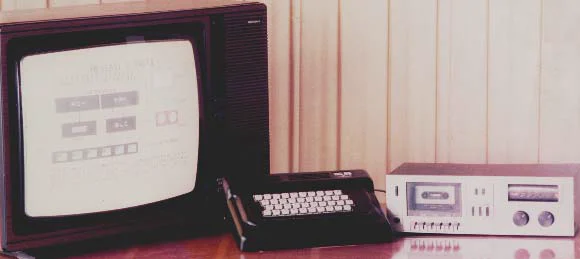
The HC-85 plugged into the family television and loaded its programs from an ordinary cassette recorder. This page puts your name into a BASIC program, turns it into the sound the computer would have recorded on tape and gives you the file. It still loads today.
Adrian Petrescu and Francisc Iacob designed the laboratory model of the HC-85 in the computer department of the Bucharest Polytechnic Institute. Traian Mihu, of the Bucharest computer factory, recalls that the HC-85 was built in 1984 at the department’s initiative. At ICE Felix, the engineers Eugen Dobrovie and Sandu Anghel adapted the design for series production, which began in 1985, according to the book edited by Petrescu.
It connected to a black-and-white television, a PAL colour television or a colour monitor, and its programs came from a cassette recorder. Keyboard and board shared one case. At the back were sockets for power, television, monitor, cassette recorder and two joysticks, plus an expansion connector.
Processor
Z80A, 3.5 MHz
Memory
48 KB RAM, 16 KB EPROM
Picture
256 × 192 dots, 8 colours
Keyboard
40 keys + reset
Programs
on audio cassette
The first version of the HC-85, V0.1, between a television and a cassette recorder, from figure 1 of the paper “Microcalculatorul personal HC-85”. Photo: A. Petrescu, F. Iacob, T. Domocos, T. Mihu, E. Dobrovie, Wikimedia Commons, GFDL.
12,000 lei
More than four months’ average pay
The factory plan set the price at 40,000 lei. Traian Mihu recalls bringing it down to 12,000 lei: “Thanks to the competitive price, the HC85 could be widely used by pupils and students […]”.
In 1985 the average net wage was 2,827 lei a month, so 12,000 lei was about 4.2 months’ pay. The old-computers.com archive lists a price of 15,000 lei in 1987; at that year’s average net wage of 2,872 lei, that was 5.2 months’ pay.
The computer’s designers write that schools and universities bought it “in large quantities”. By April 1990 the education ministry had found “several thousand computers, mostly HC-85s and compatibles” in schools.
40 keys
One key, one whole word
The 40 keys were wired in a grid of eight rows by five columns, which the computer read every 20 milliseconds. The BASIC taken over from the Spectrum typed whole words with one press: when a K flashed on screen, the computer was waiting for a command, and the P key typed PRINT, the J key typed LOAD.
Try it on the keyboard in the picture or with the buttons below. The command that started loading from tape was LOAD "": J, then SYMBOL SHIFT with P twice, then ENTER. The deck starts and the picture on the tape loads on the television; SPACE stops the tape.
After working on the aMIC, an earlier personal computer, the Polytechnic researchers saw that similar machines abroad had far more software. They took the Sinclair ZX Spectrum, the successful British computer, as their model, so they could use the programs written for it: the BASIC interpreter, languages such as LOGO, Pascal or C, word processors, games.
The hardware they built differently. In the Spectrum, picture, keyboard and tape all went through one custom-made chip, the ULA. The HC-85 spread those jobs over ordinary logic chips, and the 1987 ICE Felix technical manual lists Soviet equivalents for some of them. Its parts list counts 78 integrated circuits: the Z80A processor at 3.5 MHz; 24 4116 memory chips of 16 kilobits each, making 48 kilobytes; eight 2-kilobyte EPROMs holding the BASIC interpreter; 41 standard logic chips; two data-bus buffers, a voltage regulator and a PAL encoder for the television.
On the first machines the ROM chips were Soviet, in white ceramic packages. A later version, in a plastic case, used MMN2616 chips made by Microelectronica, in plastic packages.
6,912 bytes
Why the picture appears in bands
The picture is 256 dots wide and 192 high, one bit each: 6,144 bytes. Another 768 bytes hold the colours. The whole screen fits in 6,912 bytes, starting at address 16,384.
Memory splits the picture into three horizontal bands. In each band, the first 32 bytes hold the top line of the first row of characters, the next 32 the top line of the second row, and so on; only when the rows run out comes the second line of each row. That is why a picture loaded from tape appears in sparse bands that fill in, with the colours arriving last.
Scroll to follow the picture as it loads byte by byte. The counter shows where you are on the tape, and the stripes round the edge follow every change in the signal, as the loading routine drew them.
8 × 8 dots
Two colours in every square
Colour is not set dot by dot. Each square of eight by eight dots has a single colour byte, which sets the colour of the drawing and of the background, each one of eight. If an object needed a third colour in a square, the whole square changed colour.
The loading picture on screen is drawn to the same rule: no square holds more than two colours.
2 × 244 µs
Two waves for each bit
The computer recorded a square-wave signal on tape. A 0 bit is two half-waves of 855 processor clock ticks each, or 244 microseconds. For a 1 bit each half-wave lasts twice as long: 489 microseconds. The speed depends on the mix of the two, between 1,023 and 2,047 bits a second.
A file has two blocks: a short header, with the name and length, and the data block. Each block opens with an 807 Hz tone, lasting five seconds before the header and two seconds before the data, followed by two short sync half-waves. Each block ends with a check byte, which tells the computer whether it misread the tape.
The HC-85 kept the Spectrum’s tape format, so programs passed between the two computers. The picture on screen, 6,912 bytes, takes about 42 seconds to load.
LOAD ""
Load your name
Type a name. The page puts it into a three-line BASIC program that blacks out the screen, prints your name in yellow and beeps, then saves it to tape in the computer’s cassette format.
The HC-85 had no accented letters: on tape they lose their accents. Characters the computer could not type are left out, and the name stops at 24 characters.
Share this page
Keep the volume low: the signal is shrill.
To load it on an HC-85 or a ZX Spectrum, type LOAD "" and play the .wav into the cassette input. The .tap opens in ZX Spectrum emulators. If the download does not start inside the Facebook app, open the page in your browser.
1986–1994
Programs from magazines and cassettes
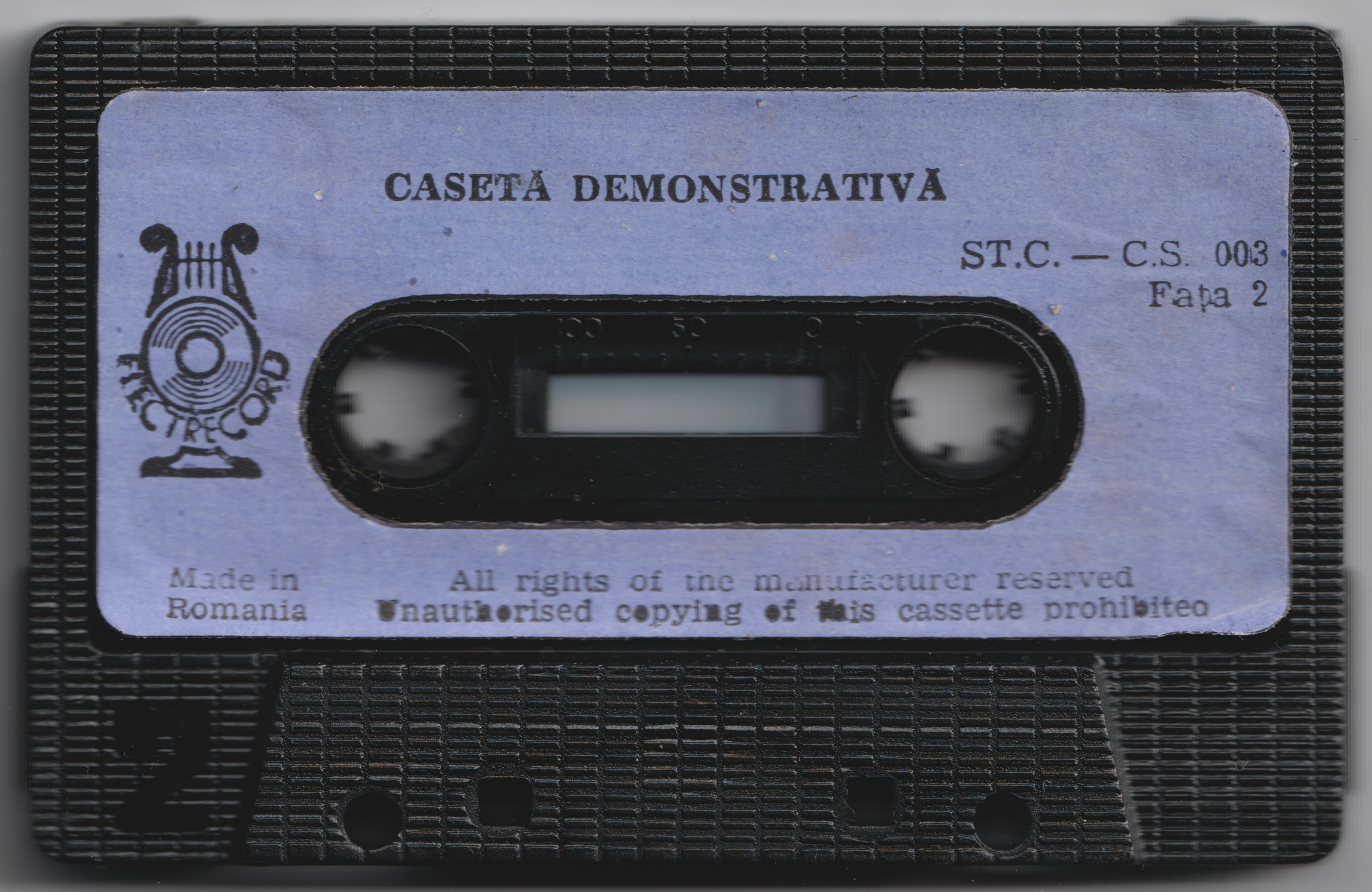
The computer came with a demonstration cassette of programs from ICE Felix: on one side, a tour of the computer and four lessons; on the other, the snake game Serpenti, recorded twice.
Magazines printed programs too. In 1986 the Știință și Tehnică supplement Calculatorul, nimic mai simplu! printed TRIGRAF, a program that plotted trigonometric functions, “written in BASIC – HC 85”. In 1988 the electronics magazine Tehnium printed a clock program for “HC-85 or SPECTRUM computers”. Readers typed them in line by line and saved them on cassette.
ICE Felix went on with the HC-88, HC-90, HC-91 and HC-2000; the HC-90, HC-91 and HC-91+ kept the plastic case of the later HC-85. The Retro IT computer history museum in Arad has an HC-85 in its collection.
LOAD ""
A snake game
Side B of the demonstration cassette carried a game called Serpenti, and its label read “All rights of the manufacturer reserved”. Nobody knows who holds those rights today, so the game here is a new snake game, written for this page in the computer’s BASIC, short enough to fit a magazine page: 28 lines.
Select “Load the game”. Stripes appear round the edge of the screen, as when loading from tape, and loading takes about 18 seconds. To start, press a key or tap a button below the game. Steer with Q, A, O and P or the arrow keys.
The game runs in an emulator that uses the original ROM of the 48K ZX Spectrum, the British computer the HC-85 was based on.
The BASIC listing, as a magazine might have printed it
10 REM SNAKES for the HC-85, mariuscomper.uk/hc-85
20 BORDER 0: PAPER 0: INK 7: CLS : DIM x(400): DIM y(400): RANDOMIZE
30 LET h=1: LET t=1: LET g=3: LET s=0: LET dx=1: LET dy=0
40 PRINT AT 0,1; INK 6;"SNAKES";AT 0,10; INK 5;"Q A O P";AT 0,21; INK 7;"SCORE 0"
50 FOR i=0 TO 31: PRINT AT 1,i; PAPER 1;" ";AT 21,i; PAPER 1;" ": NEXT i
60 FOR i=2 TO 20: PRINT AT i,0; PAPER 1;" ";AT i,31; PAPER 1;" ": NEXT i
70 LET x(1)=8: LET y(1)=11: PRINT AT 11,8; PAPER 4;" "
80 PRINT AT 15,(32-LEN "PRESS ANY KEY")/2; INK 6;"PRESS ANY KEY": PAUSE 0: PRINT AT 15,1;"                              "
90 GO SUB 500
100 LET c=CODE INKEY$: IF c=0 THEN GO TO 150
110 IF (c=113 OR c=81 OR c=55 OR c=11) AND dy=0 THEN LET dx=0: LET dy=-1
120 IF (c=97 OR c=65 OR c=54 OR c=10) AND dy=0 THEN LET dx=0: LET dy=1
130 IF (c=111 OR c=79 OR c=53 OR c=8) AND dx=0 THEN LET dx=-1: LET dy=0
140 IF (c=112 OR c=80 OR c=56 OR c=9) AND dx=0 THEN LET dx=1: LET dy=0
150 LET nx=x(h)+dx: LET ny=y(h)+dy: LET a=ATTR (ny,nx)
160 IF a=15 OR a=39 THEN GO TO 600
170 LET h=h+1: IF h>400 THEN LET h=1
180 LET x(h)=nx: LET y(h)=ny: PRINT AT ny,nx; PAPER 4;" "
190 IF a=23 THEN LET g=g+3: LET s=s+10: PRINT AT 0,27;s: BEEP .02,24: GO SUB 500
200 IF g>0 THEN LET g=g-1: GO TO 100
210 PRINT AT y(t),x(t);" ": LET t=t+1: IF t>400 THEN LET t=1
220 GO TO 100
500 LET fx=INT (RND*30)+1: LET fy=INT (RND*19)+2
510 IF ATTR (fy,fx)<>7 THEN GO TO 500
520 PRINT AT fy,fx; PAPER 2;" ": RETURN
600 BEEP .4,-12: PRINT AT 10,9; PAPER 2; INK 7;"  GAME OVER  "
610 PRINT AT 12,(32-LEN " SCORE 00 - PLAY AGAIN? ")/2; PAPER 7; INK 0;" SCORE ";s;" - PLAY AGAIN? "
620 PAUSE 50: PAUSE 0: RUN
The link opens the page with your name already on the cassette.
Share this page
Sources
File format and tape timings are those of the cassette routine in the 48K ZX Spectrum ROM, which the HC-85 kept. The sound this page makes was loaded with that routine in the SkoolKit simulator: the program loaded, started by itself and printed the name. The lettering on screen and the loading picture were drawn for this page.
A. Petrescu, F. Iacob, T. Domocos, T. Mihu, E. Dobrovie, „Microcalculatorul personal HC-85”, retrospective technical account by its authors from the Bucharest Polytechnic and ICE Felix (processor, memory, picture, keyboard, cassette, the choice of the Spectrum as model, sales to schools).
ICE Felix, Manual tehnic HC-85, 1987, Appendix A, parts list (78 integrated circuits, 24 × 4116, 8 × 2716, Soviet K555 equivalents).
Adrian Petrescu (coord.), abc de calculatoare personale și... nu doar atât, Editura Tehnică, 1990, vol. 1 (series production from 1985) and vol. 2 (the school survey by April 1990).